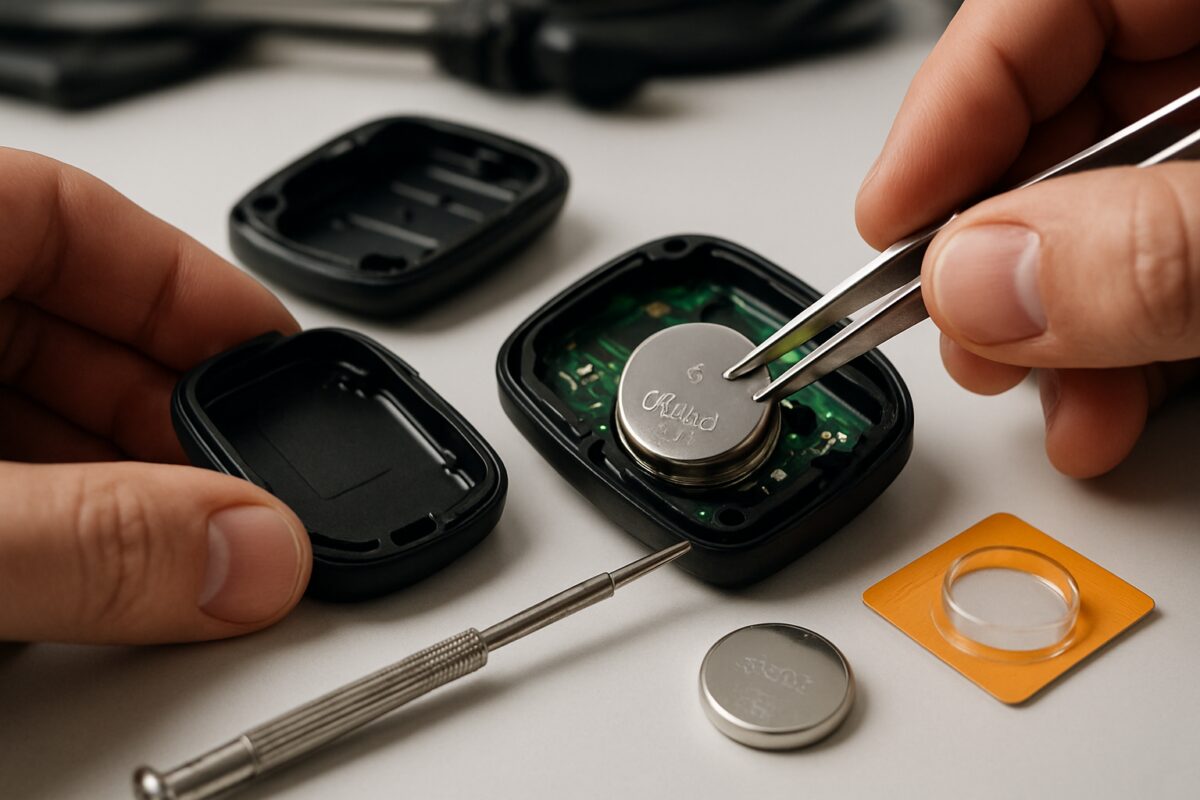
Replacing a car key battery is a simple 5-minute task that requires a compatible battery (typically CR2032 or CR2025), a small flathead screwdriver, and careful handling. The process involves opening the key fob, removing the dead battery, inserting the new one with correct polarity, and reassembling the housing.
Tools and parts required
Before starting the battery replacement, gather these essential items to ensure a smooth process.
Parts needed:
- Replacement battery (CR2032, CR2025, or CR2016 depending on your key fob model)
- Anti-static wrist strap (optional but recommended)
- Protective cloth or soft surface
Tools required:
- Small flathead screwdriver or plastic prying tool
- Tweezers (for handling small components)
- Clean cloth
- Magnifying glass (if needed for reading battery markings)
Always check your vehicle handbook for the exact battery type before purchasing. Using the wrong battery size can damage your key fob’s circuitry.
Safety precautions
Key fob electronics are sensitive to static electricity and physical damage. Follow these safety guidelines:
- Work on a clean, static-free surface
- Remove any metal jewellery that could cause short circuits
- Keep the workspace well-lit to avoid losing small components
- Handle the circuit board gently to prevent damage
- Avoid touching battery terminals with bare fingers
Step-by-step instructions
Follow this systematic approach to replace your car key battery safely and effectively.
Step 1: Identify the battery type
Before opening your key fob, identify the correct battery type. Most modern key fobs use CR2032 lithium coin cells, but some require CR2025 or CR2016 batteries. Check your owner’s manual or look for markings on the existing battery once opened.
Step 2: Open the key fob
Locate the seam around your key fob’s edge. Insert a small flathead screwdriver or plastic prying tool into the groove. Gently twist to separate the two halves. Some key fobs have a small tab that needs pressing whilst pulling apart. Work slowly to avoid cracking the plastic housing.
Step 3: Remove the old battery
Once opened, you’ll see the circuit board and battery. Note the battery’s orientation – the positive (+) side usually faces up. Carefully lift out the old battery using tweezers or gently tip it out. Avoid touching the circuit board components.
Step 4: Install the new battery
Take your new battery and insert it with the same orientation as the old one. The positive terminal typically faces up, but double-check against the markings inside the fob. Press down gently until the battery sits flush in its compartment.
Step 5: Test and reassemble
Before closing the fob completely, test the buttons to ensure they’re working. If successful, align the two halves carefully and press them together until they click into place. Test all functions including lock, unlock, and any additional buttons.
Common mistakes to avoid
These frequent errors can damage your key fob or prevent proper operation:
- Installing battery backwards: Always check polarity markings inside the fob
- Forcing the housing apart: Use gentle pressure to avoid cracking the plastic
- Touching circuit components: Handle only the battery and housing edges
- Using wrong battery type: Double-check compatibility before installation
- Losing small parts: Work over a clean surface to catch any dropped components
Our AutoPartsPro specialists recommend testing your key fob monthly. Weak signals or delayed responses often indicate a battery nearing replacement time.
When should you replace it?
Key fob batteries typically last 2-4 years, but several symptoms indicate replacement time:
- Reduced operating range (need to be closer to vehicle)
- Intermittent button response
- Dashboard warning lights about key battery
- Complete key fob failure
Don’t wait for complete failure. When you notice reduced range or slow response, replace the battery promptly. This prevents being locked out of your vehicle unexpectedly.
Related maintenance you can do at the same time
While your key fob is open, consider these additional maintenance tasks:
- Clean the battery contacts with a cotton swab
- Check the central locking system operation
- Inspect the key fob housing for cracks or damage
- Test your spare key fob if you have one
- Consider replacing your vehicle’s main battery if it’s over three years old
This is also an excellent time to check other electrical components like your vehicle’s light bulbs or ensure your sensors are functioning correctly.
Frequently asked questions
How long do key fob batteries typically last?
Most key fob batteries last between 2-4 years depending on usage frequency and environmental conditions.
Can I use any CR2032 battery for my key fob?
Yes, but choose quality brands for longer life. Avoid cheap batteries that may leak or fail prematurely.
What happens if I install the battery backwards?
Installing backwards prevents operation but rarely causes permanent damage. Simply remove and reinstall with correct polarity.
Why does my key fob still not work after battery replacement?
Check battery orientation, ensure proper contact, or the fob may need reprogramming to your vehicle’s system.
Should I replace both key fob batteries at the same time?
Yes, if you have multiple fobs of similar age, replacing both prevents future inconvenience.
Regular key fob maintenance prevents unexpected lockouts and ensures reliable vehicle access. With the proper battery and careful handling, this straightforward maintenance task keeps your vehicle’s security system functioning optimally for years to come.

 Loading...